Kerberos RC4 Deprecation in Active Directory
Overview
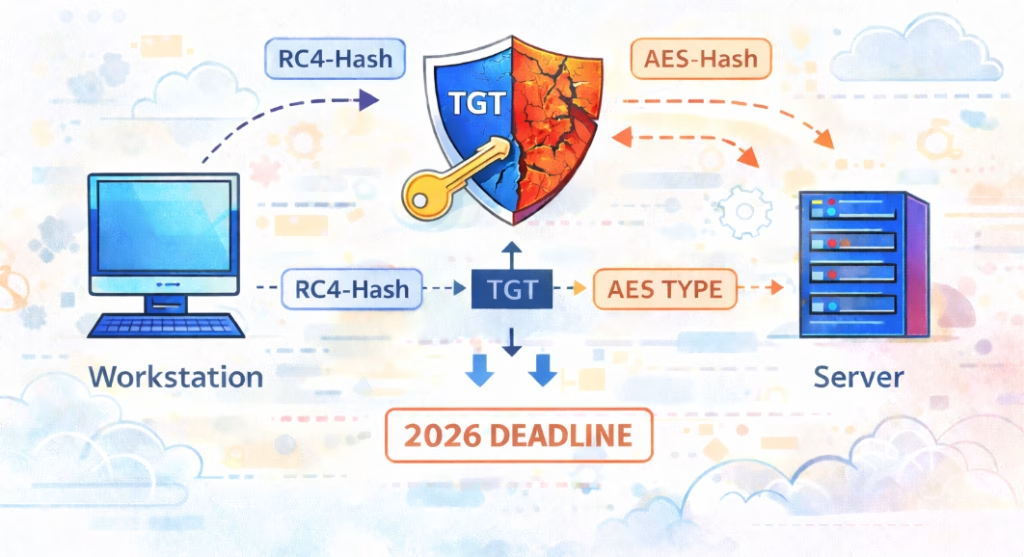
Microsoft has published an official plan to deprecate and disable RC4 in Kerberos due to long-standing cryptographic weaknesses and the risk highlighted in CVE-2026-20833. This change impacts all Active Directory environments because Kerberos encryption types are negotiated by Domain Controllers and clients during authentication. While RC4 has been considered insecure for years, many environments still rely on it indirectly due to old service account passwords or legacy applications. Microsoft is rolling this out in phases across 2026, with auditing first, then enforcement, and finally complete removal of RC4 support.
Why This Matters
RC4 is a weak stream cipher vulnerable to multiple cryptographic attacks. In Active Directory, RC4 is often still used not because administrators chose it, but because some accounts have very old passwords that only have RC4 keys derived. When RC4 is disabled, any account or application that cannot use AES will fail Kerberos authentication. That means broken services, failed logons, and outages that can be difficult to diagnose if you are not prepared.
Microsoft’s Phased Timeline
January 2026
RC4 still works. Microsoft introduces new Kerberos code paths and changes how Domain Controllers evaluate encryption types for Kerberos tickets. Auditing mechanisms are added so you can see RC4 usage in your environment before anything is blocked. This is the assessment and preparation phase.
April 2026
Domain Controller defaults switch to AES-SHA1. Implicit RC4 fallback is disabled. This is the major behavioral change. Legacy applications or accounts that rely on RC4 will begin failing authentication unless you explicitly allow RC4 or remediate them.
July 2026
Audit mode is removed. RC4 is disabled by default. Any remaining RC4 dependencies will break. At this point, environments that did not clean-up will experience real authentication failures.
How RC4 Still Appears in Active Directory
In most modern domains, RC4 appears because of old passwords. When a user or service account password has not been changed in many years, the account may only have an RC4 key and not AES keys. Kerberos then has no choice but to use RC4 for that account. This is especially common with old service accounts, scheduled tasks, SQL services, IIS application pools, and third-party appliances that were joined to the domain years ago and never updated.
Modern Windows Already Supports AES
All supported versions of Windows already support AES-SHA1 for Kerberos. In most environments, there is no platform limitation preventing the use of AES. Ongoing RC4 usage is almost always caused by old account passwords, legacy applications, or non-Windows systems, not because Windows lacks AES support.
RC4 Across Users, Workstations, Servers, and Applications
User Accounts
When a user logs on, their workstation requests a Ticket Granting Ticket (TGT) from a Domain Controller. The encryption types used depend on the keys available for the user account. If the user’s password is very old and only has an RC4 key, the DC may issue tickets using RC4, even if the domain supports AES. A single legacy user account can therefore force RC4 into the authentication flow.
Workstations
The workstation is the Kerberos client. It negotiates supported encryption types with the Domain Controller. Modern Windows versions support AES, but they will still accept RC4 if the DC offers it and if the target account only has RC4 keys. This means a fully patched workstation can still end up using RC4 because of a weak account on the other side.
Servers and Domain Controllers
Domain Controllers issue TGTs and service tickets based on the encryption types they believe are valid for the account and service. Member servers hosting services then decrypt those tickets using the keys tied to their computer account or service account. If that account only has RC4 keys, the DC will fall back to RC4 and the server will accept it. When RC4 is blocked, those services will fail authentication.
Applications and Services
Applications usually do not choose RC4 directly. They run under user or service accounts, and the encryption type is determined by the keys on those accounts and what the client and DC negotiate. Problems show up when applications run under very old service accounts or when the application or appliance has an outdated Kerberos implementation that does not support AES. In both cases, disabling RC4 will cause authentication failures.
Putting It All Together
RC4 usage is a chain problem. One weak link forces the whole flow to downgrade. A user or service account has only RC4 keys. A workstation or server requests a Kerberos ticket. The Domain Controller issues a ticket using RC4 because that is all the account supports. The target server or application accepts RC4 because that is the only matching key. When Microsoft disables RC4, that chain breaks and authentication fails.
Focus on Non-Windows and Legacy Devices
Non-Windows devices and older appliances joined to Active Directory are more likely to lack AES support. These systems may continue working while RC4 is allowed but will fail authentication once RC4 is blocked. They should be identified early using logs and scripts so they can be updated, reconfigured, or replaced before enforcement phases.
Visualizing Kerberos Encryption Negotiation
Microsoft also provides a Kerberos Encryption Type Calculator that lets you simulate how clients, Domain Controllers, and service accounts negotiate encryption types (RC4 vs AES), which is useful for validating the impact of enabling AES and eventually disabling RC4: https://microsoft.github.io/Kerberos-Crypto/pages/etype-calc.html
Microsoft’s Assessment Scripts
Microsoft published two PowerShell scripts that should be run on Domain Controllers.
List-AccountKeys.ps1
Finds accounts that are effectively RC4-only due to old passwords. These are the highest risk accounts. The usual fix is a password reset, so AES keys are generated: https://github.com/microsoft/Kerberos-Crypto/blob/main/scripts/List-AccountKeys.ps1
Sample output:

Get-KerbEncryptionUsage.ps1
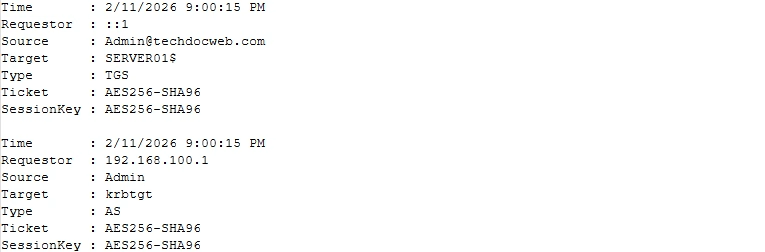
Reports actual RC4 usage based on Domain Controller logs. This shows which users, workstations, servers, and applications are still negotiating RC4 today. Used together, these scripts show both potential risk and real-world impact: https://github.com/microsoft/Kerberos-Crypto/blob/main/scripts/Get-KerbEncryptionUsage.ps1
Sample output:
Enhanced Kerberos Event Logging
Recent Windows updates improve Kerberos logging on Domain Controllers. Security events such as 4768 and 4769 now include the encryption types offered by the client, the encryption types available on the account, and the encryption type actually selected. This makes it possible to identify RC4 usage directly from the Security event log, not only from scripts, and pinpoint which users, devices, and services are still negotiating RC4: Beyond RC4 for Windows authentication
RC4 Safety Switch: RC4DefaultDisablementPhase
Microsoft provides a registry value on DCs named RC4DefaultDisablementPhase with three modes:
- “0” RC4 allowed. Legacy behavior.
- “1” Audit mode. RC4 is allowed but usage is logged. This is the recommended starting point.
- “2” Enforce mode. RC4 is blocked and only AES is allowed. Any remaining RC4 dependencies will fail.
This switch allows you to control the transition instead of being surprised by default changes later in 2026.
Recommended Migration Plan
- Deploy the January 2026 updates to Domain Controllers and set RC4DefaultDisablementPhase to 1 for audit mode.
- Run Get-KerbEncryptionUsage.ps1 to identify where RC4 is being used.
- Run List-AccountKeys.ps1 to find accounts that are effectively RC4 only.
- Enable AES, in addition to RC4, for devices and accounts that don’t have it enabled yet.
- Reset passwords for affected service and user accounts so AES keys are generated. Validate any legacy applications.
- Monitor logs and repeat until RC4 usage is eliminated.
- Move to RC4DefaultDisablementPhase 2 in a controlled change window before April or July 2026.
What Will Break If You Do Nothing
Old service accounts with unchanged passwords. Legacy applications with outdated Kerberos implementations. Old appliances or NAS devices joined to the domain. Anything relying on implicit RC4 fallback. When Microsoft flips the defaults, these will fail authentication and surface as Kerberos errors across Domain Controllers and application logs.
Bottom Line
RC4 in Kerberos is finally on a real retirement clock. From an enterprise change management perspective, 2026 deadlines are very close. The good news is Microsoft provided auditing, detection scripts, and a safety switch to make this a controlled transition. If you start auditing now and fix old service accounts, this can be a non-event. If you ignore it, April and July 2026 are likely to be very noisy months in your environment.
References
Microsoft Support. How to manage Kerberos KDC usage of RC4 for service account ticket issuance changes related to CVE-2026-20833
https://support.microsoft.com/en-us/topic/how-to-manage-kerberos-kdc-usage-of-rc4-for-service-account-ticket-issuance-changes-related-to-cve-2026-20833-1ebcda33-720a-4da8-93c1-b0496e1910dc
Microsoft Windows Server Blog. Beyond RC4 for Windows authentication
https://www.microsoft.com/en-us/windows-server/blog/2025/12/03/beyond-rc4-for-windows-authentication
NIST National Vulnerability Database. CVE-2026-20833
https://nvd.nist.gov/vuln/detail/CVE-2026-20833
Microsoft Kerberos Crypto. Kerberos Encryption Type Calculator
https://microsoft.github.io/Kerberos-Crypto/pages/etype-calc.html
Microsoft Kerberos Crypto GitHub. List-AccountKeys.ps1
https://github.com/microsoft/Kerberos-Crypto/blob/main/scripts/List-AccountKeys.ps1
Microsoft Kerberos Crypto GitHub. Get-KerbEncryptionUsage.ps1
https://github.com/microsoft/Kerberos-Crypto/blob/main/scripts/Get-KerbEncryptionUsage.ps1
Found this useful? Share with others: