Purview Audit vs. Entra Sign-In Logs
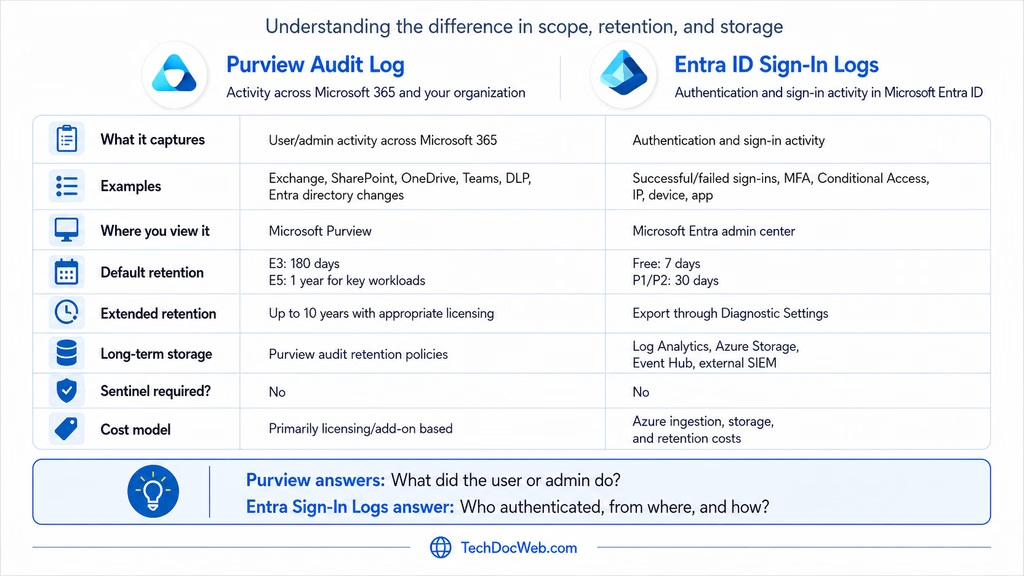
Microsoft Purview Audit and Microsoft Entra ID Sign-in Logs are often confused because both contain identity-related information. However, they capture different activity and use different retention mechanisms.
Purview Audit Logs vs. Entra ID Sign-In Logs
| Purview Audit Log | Entra ID Sign-in Logs | |
|---|---|---|
| What it captures | User and administrator activity across Microsoft 365 services | Authentication and sign-in activity |
| Examples | Exchange, SharePoint, OneDrive, Teams, DLP, Entra directory changes | Successful/failed sign-ins, MFA, Conditional Access, IP, device, application |
| Where you view it | Microsoft Purview | Microsoft Entra admin center |
| Default retention | Audit Standard: 180 daysAudit Premium: 1 year for key workloads | Entra Free: 7 daysEntra P1/P2: 30 days |
| Extended retention | Up to 10 years with appropriate licensing | Export through Entra Diagnostic Settings |
| Long-term storage options | Purview Audit retention policies | Log Analytics, Azure Storage, Event Hub, external SIEM |
| Sentinel required? | No | No |
| Cost model | Primarily licensing/add-on based | Azure ingestion, storage, and retention costs |
At a high level:
Purview Audit: What did the user or administrator do?
Entra Sign-in Logs: Who authenticated, when, from where, and how?
Microsoft Purview Audit Retention
Microsoft Purview Audit collects user and administrator activity from services throughout Microsoft 365, including:
- Exchange
- SharePoint
- OneDrive
- Microsoft Teams
- Microsoft Entra ID
- Microsoft Purview and DLP
- Administrative configuration changes
Audit Standard retains audit records for 180 days by default.
With Audit Premium, Microsoft Entra ID, Exchange, OneDrive, and SharePoint audit records are retained for one year by default. Other activities are generally retained for 180 days.
With the appropriate 10-Year Audit Log Retention add-on, supported audit records can be retained for up to 10 years.
What About Entra Audit Logs?
Microsoft Entra Audit Logs record changes made within the directory, such as:
- User creation or deletion
- Group membership changes
- Application changes
- Role assignments
- Conditional Access policy changes
- License changes
Some Entra audit activity is also available through the Microsoft Purview Unified Audit Log.
This is where the terminology can become confusing.
Purview retention can extend supported Entra audit activity, but it does not extend the native retention period of Entra Sign-in Logs. Microsoft specifically identifies the Entra activity logs and the Microsoft 365 Unified Audit Log as separate logging systems.
Entra Sign-In Log Retention
Entra Sign-in Logs capture authentication activity, including:
- Successful and failed sign-ins
- Source IP addresses
- Geographic location
- Applications
- Device information
- MFA authentication
- Conditional Access results
- Interactive and non-interactive sign-ins
Native retention is:
| Entra License | Sign-In Log Retention |
|---|---|
| Microsoft Entra ID Free | 7 days |
| Microsoft Entra ID P1 | 30 days |
| Microsoft Entra ID P2 | 30 days |
If longer retention is required, the logs need to be exported before the native retention period expires.
Extending Entra Sign-In Log Retention
Long-term retention can be configured through:
Microsoft Entra admin center → Entra ID → Monitoring & health → Diagnostic settings
From Diagnostic Settings, Entra logs can be sent to:
- Log Analytics Workspace
- Azure Storage
- Event Hub
- External SIEM solutions
Log Analytics Workspace
A Log Analytics Workspace is a good option when the organization wants to retain and query historical sign-in activity using KQL.
Common log categories include:
SignInLogs
NonInteractiveUserSignInLogs
ServicePrincipalSignInLogs
ManagedIdentitySignInLogs
AuditLogs
Microsoft provides direct integration between Entra Diagnostic Settings and Azure Monitor / Log Analytics for this purpose.
Microsoft Sentinel
Microsoft Sentinel is not required simply to retain Entra Sign-in Logs.
Sentinel can be enabled on top of a Log Analytics Workspace when SIEM capabilities are also required, such as:
- Security detections
- Incidents
- Threat hunting
- Workbooks
- Automation
- Correlation with other security logs
If Sentinel is already being used as the organization’s SIEM, sending Entra logs to the associated Log Analytics Workspace usually makes sense.
Azure Storage
Azure Storage can also be used for long-term archival when logs primarily need to be retained for compliance or investigation purposes and do not need to remain immediately searchable.
Event Hub / External SIEM
Entra Diagnostic Settings can stream logs to an Azure Event Hub when the organization wants to forward them to an external SIEM or logging platform.
Which Retention Method Should You Use?
The first question should be:
Which logs need to be retained, and for how long?
If the requirement is to retain Microsoft 365 user and administrative activity, Purview Audit retention may be the appropriate solution.
If the requirement is to retain authentication history, MFA results, Conditional Access results, IP addresses, device details, or other sign-in information, Entra Sign-in Logs should be exported using Diagnostic Settings.
A common architecture is:
Microsoft Entra ID → Diagnostic Settings → Log Analytics Workspace → Optional Microsoft Sentinel
For compliance-focused archival:
Microsoft Entra ID → Diagnostic Settings → Azure Storage
The key takeaway is that increasing Purview Audit retention does not automatically increase Entra Sign-in Log retention.